
Jeti DS-14 how do I setup for AccuRC sim.?
- StarLog
-
 Topic Author
- Offline
- New Member
-

- Posts: 8
- Thank you received: 0
TPL_KUNENA_MESSAGE_CREATED Jeti DS-14 how do I setup for AccuRC sim.?
07 Jan 2016 21:24
I have the USB dongle working with a R3 satellite, and the AccuRC sim see's the dongle and Satellite.
When I give throttle, the heli goes up, but the controls do not seem to make any difference, no matter what I setup.
Not sure what to setup in the DS-14, or in the AccuRC sim.
Any help is great.!
When I give throttle, the heli goes up, but the controls do not seem to make any difference, no matter what I setup.
Not sure what to setup in the DS-14, or in the AccuRC sim.
Any help is great.!
Please Log in or Create an account to join the conversation.
- ScorpionTDL
-
- Offline
- Junior Member
-

- Posts: 20
- Thank you received: 8
TPL_KUNENA_MESSAGE_REPLIED_NEW Jeti DS-14 how do I setup for AccuRC sim.?
08 Jan 2016 07:36
I'm using AccuRC with a Rsat2 and my DC-16.
The Setup was a bit trial and e
rror but nothing to complicated. If you ever setup a FBL System you should normaly be fine.
Set your Radio to Heli with a mechanical swash plate. This should avoide any mixing.
I attached my Config file (mit be a bit wonky as I'm using it for AccuRC and Phoienix simultaniously). Its mode 2. SA as throttle hold, SB to change the flight modes. SC as AUX2 and SD as AUX3.
In AccuRC go to TX config (ensure that you are running the latest AccuRC Version, they changed the dialogs with the last version). Set Transmitter Type to Custom, Change Adapter Type to PPM Reciever.
Use the Setup Custom Transmitter Button and follow the instructions. Afterwards check if all chanels are mapped correctly.
I had some trouble getting all the directions right. The Wizzard seems to have some problems detecting them correctly. As long as its only the direction just reverse the direction in the DS-14 (don't bother trying it in AccuRC)
The Setup was a bit trial and e
rror but nothing to complicated. If you ever setup a FBL System you should normaly be fine.
Set your Radio to Heli with a mechanical swash plate. This should avoide any mixing.
I attached my Config file (mit be a bit wonky as I'm using it for AccuRC and Phoienix simultaniously). Its mode 2. SA as throttle hold, SB to change the flight modes. SC as AUX2 and SD as AUX3.
In AccuRC go to TX config (ensure that you are running the latest AccuRC Version, they changed the dialogs with the last version). Set Transmitter Type to Custom, Change Adapter Type to PPM Reciever.
Use the Setup Custom Transmitter Button and follow the instructions. Afterwards check if all chanels are mapped correctly.
I had some trouble getting all the directions right. The Wizzard seems to have some problems detecting them correctly. As long as its only the direction just reverse the direction in the DS-14 (don't bother trying it in AccuRC)
The following user(s) said Thank You: StarLog
Please Log in or Create an account to join the conversation.
- StarLog
-
Topic Author
- Offline
- New Member
-
- Posts: 8
- Thank you received: 0
TPL_KUNENA_MESSAGE_REPLIED_NEW Jeti DS-14 how do I setup for AccuRC sim.?
09 Jan 2016 20:12 - 09 Jan 2016 21:01
ScorpionTDL
Seems I am not able to run your config.
i upgraded to 4.0 firmware.
is the problem because i do not hve those modules downloaded.?
How do I get past the model not registered.
The low voltage I can fix later.
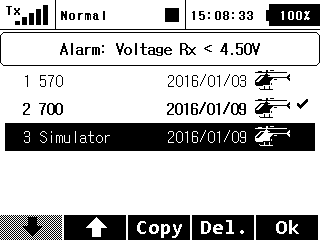
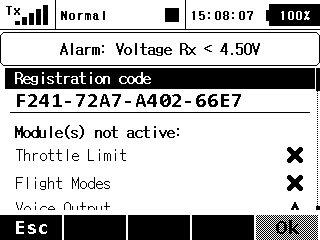
Seems I am not able to run your config.
i upgraded to 4.0 firmware.
is the problem because i do not hve those modules downloaded.?
How do I get past the model not registered.
The low voltage I can fix later.
Last edit: 09 Jan 2016 21:01 by StarLog.
Please Log in or Create an account to join the conversation.
- ScorpionTDL
-
- Offline
- Junior Member
-
- Posts: 20
- Thank you received: 8
TPL_KUNENA_MESSAGE_REPLIED_NEW Jeti DS-14 how do I setup for AccuRC sim.?
10 Jan 2016 05:58
Hmm, seems I'm using some functions that are not registered for your DS-14. I did not know that the 14 refuses to open a model that includes some unregistered functions, I expected it would just print a warning and disable the stuff it can't do.
I can try to create a model that just uses the basic stuff, the rest is not needed anyway for the sim. But it needs to wait till tomorrow.
However it's indeed just a basic blank model with a mechanical swash plate. The switch setup for the flight modes and the AUX is just a extra. The basic controlling should work as long as the receiver is set to ppm and AccuRC is configured correctly.
I can try to create a model that just uses the basic stuff, the rest is not needed anyway for the sim. But it needs to wait till tomorrow.
However it's indeed just a basic blank model with a mechanical swash plate. The switch setup for the flight modes and the AUX is just a extra. The basic controlling should work as long as the receiver is set to ppm and AccuRC is configured correctly.
Please Log in or Create an account to join the conversation.
- StarLog
-
Topic Author
- Offline
- New Member
-
- Posts: 8
- Thank you received: 0
TPL_KUNENA_MESSAGE_REPLIED_NEW Jeti DS-14 how do I setup for AccuRC sim.?
10 Jan 2016 21:55
Thanks i will wait.
Please Log in or Create an account to join the conversation.
- ScorpionTDL
-
- Offline
- Junior Member
-
- Posts: 20
- Thank you received: 8
TPL_KUNENA_MESSAGE_REPLIED_NEW Jeti DS-14 how do I setup for AccuRC sim.?
11 Jan 2016 07:57
Give it a Try with the attached Model.
Hopefully I only used functions that are available with the Stock DS-14.
In AccuRC just go to the TX settings and use Graupner as a reciever type (I remapped the functions to the correct channels)
Your settings should look like this:
It might be needed to recalibrate your TX In AccuRC.
To use the flight modes you need to change the "Channel 5 Function" in the AccuRC Virtual Transmitter to "F-Mode" for each model:
You Jeti Reciever should be set to PPM output:
Hopefully I only used functions that are available with the Stock DS-14.
In AccuRC just go to the TX settings and use Graupner as a reciever type (I remapped the functions to the correct channels)
Your settings should look like this:
Attachment TX-Settings.jpg not found
It might be needed to recalibrate your TX In AccuRC.
To use the flight modes you need to change the "Channel 5 Function" in the AccuRC Virtual Transmitter to "F-Mode" for each model:
Attachment VirtualTX.jpg not found
You Jeti Reciever should be set to PPM output:
Attachment JetiRX.jpg not found
The following user(s) said Thank You: StarLog
Please Log in or Create an account to join the conversation.
Time to create page: 0.356 seconds